Documents & terminology
Flight itinerary template
What every field on a flight itinerary is for, a blank structure you can copy, and why generating one beats filling in a Word document by hand for most purposes.
Published 7 September 2026 · Updated 7 September 2026
Most people searching for a flight itinerary template want one of two quite different things: a blank document to lay out a trip they are planning, or something that looks like the itinerary an airline sends. This page covers the first properly, and is honest about the second.
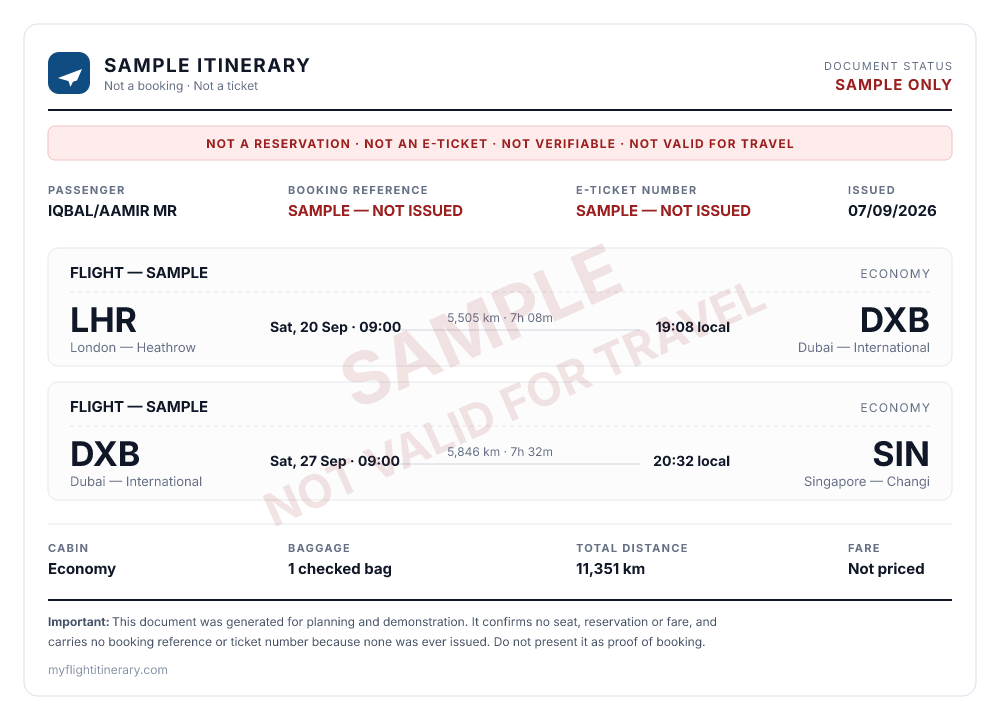
What the generator produces: real airport data and computed times, with the two reference fields left explicitly unissued and the watermark composited into the document.
The structure of an itinerary
A real airline itinerary has four blocks. A template that omits one of them will look wrong to anyone who reads a lot of them.
Passenger block. Name in SURNAME/GIVEN NAMES TITLE form — SMITH/JOHN MR. That format is not a
stylistic quirk; it mirrors how the name is stored in the reservation system. Add passenger type if
relevant: ADT adult, CHD child, INF infant.
Reference block. Booking reference and e-ticket number. These are the fields that make an itinerary checkable, and they are the ones a template cannot honestly fill in — more on that below.
Segment block, repeated once per flight:
CARRIER + FLIGHT   e.g. BA 112
FROM               IATA code, airport name, terminal
DEPARTS            date and local time
TO                 IATA code, airport name, terminal
ARRIVES            date and local time
CABIN / CLASS      e.g. Economy (Q)
AIRCRAFT           indicative only
BAGGAGE            what the fare includes
Commercial block. Base fare, taxes and charges, total, currency, baggage allowance, and the fare conditions.
A field-by-field explanation of what each one means is in every field on a flight itinerary explained.
The two fields a template cannot fill
The booking reference and the e-ticket number are issued by a reservation system in response to an actual booking. There is no version of them you can type into a blank document that means anything.
This matters more than it sounds. A booking reference is the only field on an itinerary whose entire purpose is “look this up” — six characters that retrieve the real record. Everything else on the page is descriptive. Put invented characters there and you have not made your document more complete; you have made a claim that takes one query to disprove.
So: leave them blank, or mark them explicitly as not issued. If you genuinely need a real reference, a held reservation or a refundable fare produces one — see flight reservation vs ticket.
Two times, two time zones
The single most common error in hand-filled templates is the arrival time.
Both times on an airline itinerary are local to their own airport. A flight departing London at 08:35 and arriving in New York at 11:35 is not a three-hour flight — it is about eight, because New York is five hours behind. Fill in a template by subtracting one from the other and you will get the duration wrong, and on long eastbound routes you will get the arrival date wrong too.
If you are laying out a real trip, compute each arrival rather than estimating it. The flight time zone planner does it for any airport pair on a specific date, including daylight saving and any change of calendar day.
Get the airport codes right
LON, NYC and TYO are city codes covering several airports each. They are useful on booking
sites and wrong on an itinerary, which always names a specific airport. Writing LON where you mean
LHR is the sort of detail that makes a document look untrustworthy to anyone who
works with them.
The airport code lookup covers over 4,000 airports with scheduled service, searchable by code, city or airport name.
When a template is the wrong tool
A blank Word or Google Docs template is fine for sketching. It is a poor choice when you want:
- Distances and flying times, which you would otherwise have to look up per leg
- Correct arrival times, for the reason above
- A multi-city trip, where each leg’s arrival date becomes the next leg’s baseline and one error propagates through the whole plan
- Something legible to send to someone else
For all of those, generating the document is faster and gets the arithmetic right. The sample itinerary generator on this site takes a route, dates and a passenger name, computes the distances and arrival times from real airport data, and produces a printable page. It is free and needs no account.
It also stamps every output SAMPLE — NOT VALID FOR TRAVEL and prints
SAMPLE — NOT ISSUED in the booking-reference and ticket-number fields — which is the honest state of
any document that was not produced by a reservation system, whether you build it in Word or here.
If you were looking for something that passes as real
Some people arrive at “flight itinerary template” wanting a document that will be mistaken for an airline booking — for a visa application, or to satisfy an airline asking about onward travel.
It will not work, and the reasons are practical rather than moral. Airlines verify booking references against reservation systems at check-in, in seconds. A growing number of consulates check them with the carrier directly. A document with no reference behind it fails that check; one with an invented reference fails it worse, and does so in front of the person deciding whether to board you or approve your application.
The honest alternatives cost less than they appear to. Many airlines hold a fare free for 24 hours, which produces a genuine reference that expires by itself. A refundable fare is cancellable. Both survive verification. See proof of onward travel and flight documents for visa applications for how to find out which your situation actually requires — frequently it is less than people assume.